
DEVELOPER NOTES
Ultrafast mode: measure the whole task before buying faster tokens
An October 2026 feature becomes a controlled latency experiment with honest cost accounting.

Documentation snapshot: October 14, 2026. This guide discusses the dated release described below; check the linked official documentation for current API behavior and account availability before implementation.
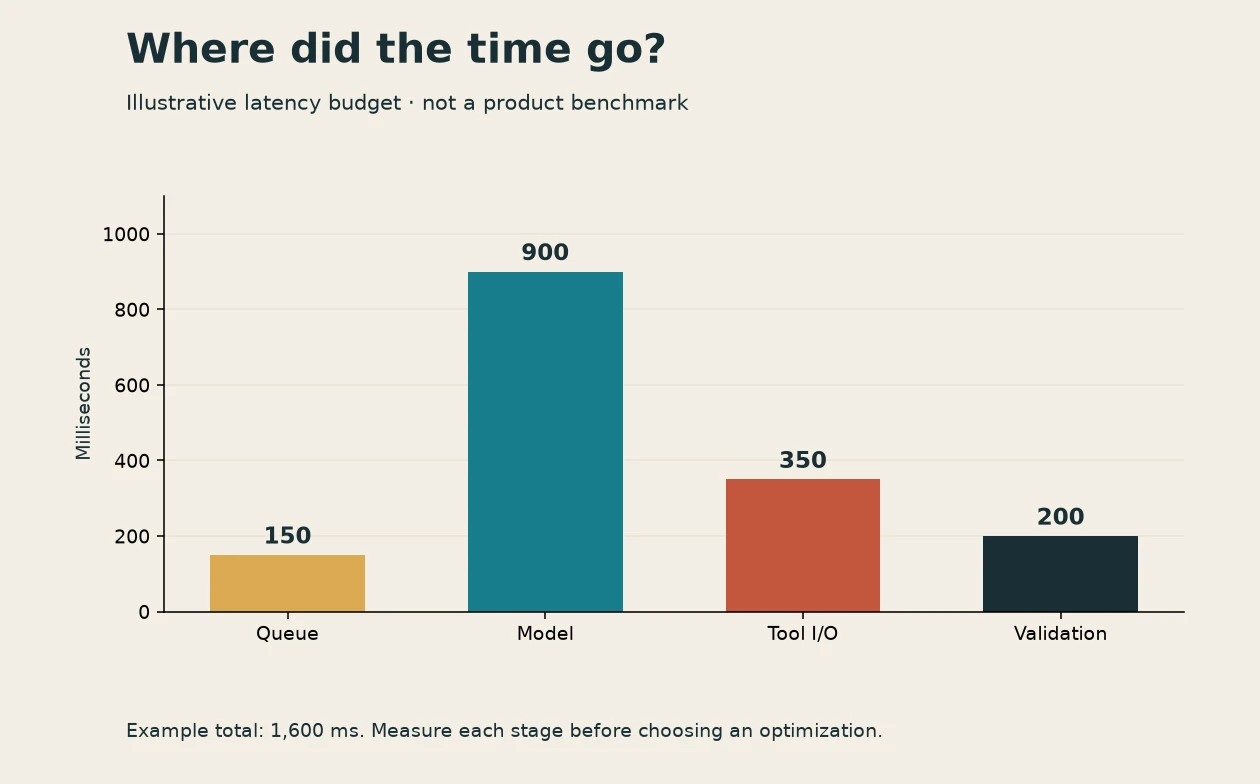
Faster text feels great. It can also hide the fact that most of your application is waiting on something else. OpenAI added GPT-6.1 Sol Ultrafast support on October 8, 2026. The official mode guide describes the service tier; the release history establishes the date. Here is how I would evaluate it without turning a speed claim into a budget surprise.
Draw the waiting line
Break the user-visible task into queue time, model work, tool work, validation, and delivery. If a database query takes eight seconds and generated text takes two, even eliminating generation completely would leave most of the wait. Those numbers are a hypothetical example, not a measurement of any provider or ProgreTech service.
Record time to first useful output and time to a completed usable result separately. A streaming cursor can arrive early while the actual answer still takes a while. Tool-heavy workflows especially need end-to-end timing because faster tokens do not automatically accelerate external APIs.
Make one controlled switch
Use a sanitized request set with short, medium, and long outputs. Hold the model, reasoning effort, tools, and prompts constant. In Responses, the documented setting is service_tier: "ultrafast". Compare against your chosen baseline configuration and record the returned effective service information where available. Recheck current pricing and eligibility rather than pasting a multiplier into a permanent budget.
Run enough repeated trials to see variability, randomize the order, and separate cold starts from warm requests. Report the median and a tail percentile with the sample size. Ten requests can reveal a broken integration; they cannot characterize every busy-hour condition. Keep failures and retries in the dataset.
Pay for useful time saved
Calculate cost per accepted result, not cost per fastest response. Include model usage, tools, retries, and any review your workflow requires. For a live pair-programming interaction, shaving a few seconds repeatedly may be valuable. For overnight classification with no waiting person, throughput or batch economics may matter more.
A useful experiment table has columns for configuration, accepted tasks, total attempts, median duration, p95 duration, and total cost. Leave cells blank until measured. If you plot hypothetical values for planning, label the figure as illustrative on the chart itself.
Set a budgeted fallback
Keep a normal tier available when the faster route is unavailable or no longer worth its cost. Bound retries and preserve cancellation. Do not replay a state-changing tool action merely because the generation layer timed out. This article was checked October 14, 2026 and contains no provider performance measurements. The win is knowing which part of the wait you are paying to reduce.
Ultrafastはタスク全体の時間で判断する
この記事は2026年10月14日に確認した資料に基づく。以下で紹介するのは、その日付の公開情報だ。実装前に、リンク先の公式資料で現在のAPI仕様とアカウントの利用条件を確認してほしい。
速く文字が出ても、タスク全体が速いとは限らない。GPT-6.1 SolのUltrafast対応は2026年10月8日の更新だ。公式説明を10月14日に確認した。この記事には独自の速度実測はない。
待ち時間を分解する
待ち行列、モデル、ツール、検証、結果表示を分ける。仮にDBが8秒、文章生成が2秒なら、生成をゼロにしても多くの待ち時間は残る。これは説明用の数字だ。最初の有用な出力と、利用可能な最終結果の時間を別々に測る。
一つだけ変える
機密情報を除いた短文・中文・長文の依頼を用意する。モデル、推論量、ツール、指示を固定し、Responsesのservice_tier: "ultrafast"を比較する。現在の料金と利用条件を確認し、有効な設定も記録する。順番を変えて繰り返し、冷えた起動と温まった処理を分ける。中央値、p95、標本数、失敗、再試行を残す。少数の成功だけで混雑時まで語らない。
合格した結果の費用で判断する
モデル、ツール、再試行、人の確認を含む費用を、受け入れたタスク数で割る。対話中の数秒と夜間一括処理の数秒では価値が違う。表には設定、合格数、試行数、中央値、p95、総費用を置き、未測定欄を想像で埋めない。説明用グラフなら図中にも架空と記す。
高速経路が使えない場合の通常経路、再試行上限、キャンセルを用意する。生成が時間切れでも、状態を変える操作を無条件に再実行しない。どの待ち時間にお金を払うか分かる実験にしよう。
Put this idea into practice
Keep reading

GPT-6.1 Sol migration: check the request before you judge the model
A September 2026 model change becomes a small, measurable migration instead of a blind string replacement.

Decisions API, October 2026 beta: build a classifier that knows when to hand off
A practical design for typed routing, abstention, error handling, and evaluation after the October 2026 beta.

September API key controls: rotate access without surprising your workers
A staged rollout for key expiration and creation policies, including the existing keys those policies do not revoke.