
DEVELOPER NOTES
CodeSeal: give your source code a history you can actually inspect
A practical tour of scans, signed evidence, registry history, and what a CodeSeal result really means.
I like shipping things. I also like being able to explain what I shipped six months later. Once an application contains handwritten code, generated code, reused libraries, and a few late-night fixes, that second part gets interesting pretty quickly. A Git commit helps, but the person receiving a package may not have your repository. They still need something concrete to inspect.
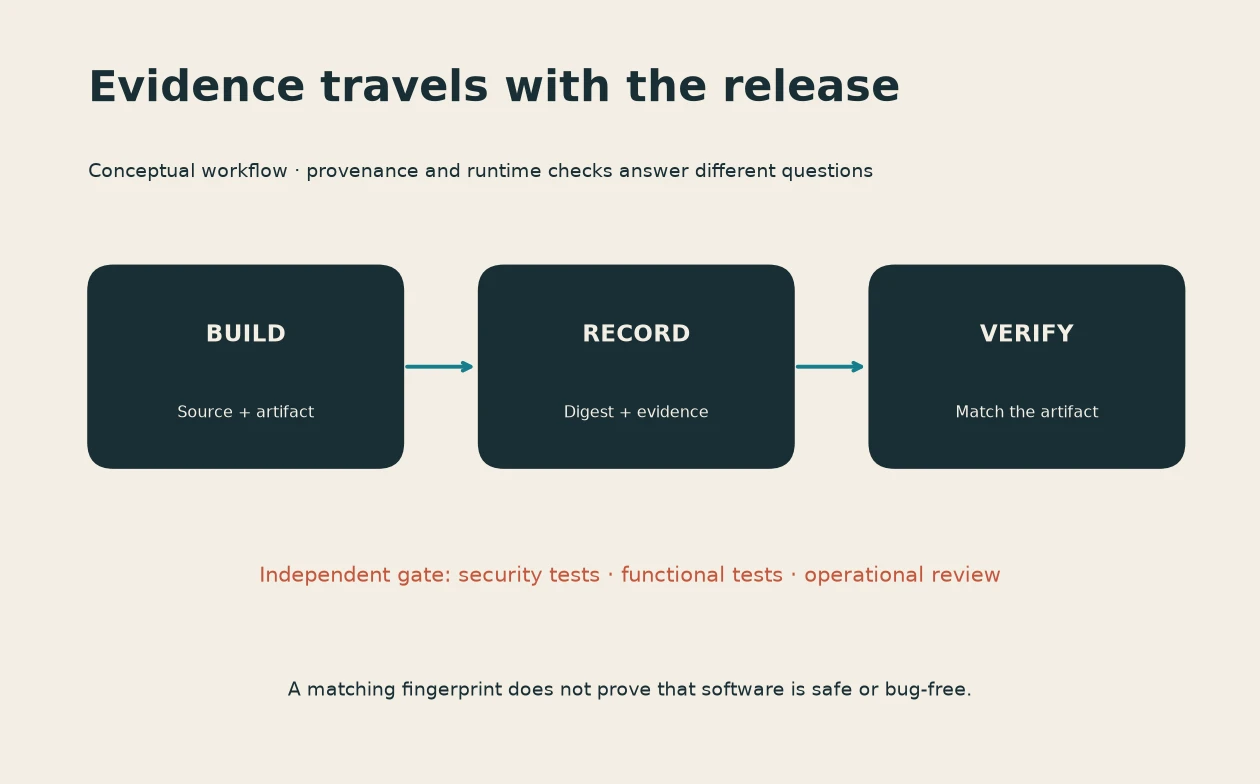
That is the problem behind CodeSeal, our ProgreTech application provenance registry. Quick disclosure: this is one of our products, so this is a first-party walkthrough. The useful promise is a signed record of observed source fingerprints and related history. It is not a magic badge that makes software trustworthy. If you build tools, ship client work, or maintain AI-assisted applications, here is where I would start.
First, prepare something you can share
Open the CodeSeal scanner. Its browser workflow accepts a ZIP or a supported GitHub repository. For a first try, use a small project you own and are comfortable submitting. Remove secrets, private customer material, generated dependencies, and anything you do not have permission to share. Public repository access and private connected-account access are different flows; private access depends on the configured integration and your authorization.
A scan fingerprints supported source without running your application. Source files are transient processing inputs, while durable registry information is evidence and metadata. That distinction matters: transient processing still means bytes reach a server. Do not confuse the absence of permanent source storage with a promise that source never leaves your machine. File paths and source labels also deserve a privacy check.
The source supports private-section markers, but filtering happens after upload or clone. If your goal is to prevent private bytes from leaving your device, remove them locally before submitting. After a scan, inspect which files were included, which were excluded, and whether the resulting scope matches the project you meant to describe. A beautifully signed record of the wrong scope is still the wrong record.
A scan and a registration are different actions
Use the scan result to inspect supported-file inventory and prior overlap. Register only when you want a durable observation and can make the required signer attestation. Keep the returned Application, Event, and Seal identifiers with the release notes. Save the signed evidence package somewhere appropriate for its contents; private evidence can contain identifying details and does not belong in public CI logs.
In the reviewed implementation, resubmitting an identical package can create a new event under the same Application ID. Changed package contents create a new Application ID, while overlap can connect related observations. Do not build your release process around the assumption that every revision will share one identifier. Record both the release version you use and the exact CodeSeal identifiers you receive.
Check the evidence, then read the interpretation
The live developer documentation explains the API. A harmless first request checks the public service status:
curl --fail --silent --show-error https://codeseal.progretech.com/api/v1/statusThe browser scanner and the registry API serve different jobs. Do not invent a source-upload endpoint from the existence of /api/v1. Verification is also more than checking that a signature is mathematically valid: the implementation distinguishes signature integrity, known registry keys, exact recorded evidence, and current registry state. A revoked observation can retain a valid signature. Similar files can have legitimate shared origins. Neither observation proves independent authorship or legal ownership.
For an AI-assisted release, I would keep three neighboring records: the reviewed source commit, the test and build evidence, and the provenance evidence. The first identifies the change; the second explains the checks; the third gives recipients a signed historical observation. None should silently substitute for the others.
Try the smallest useful release
My suggestion is simple: start with one non-sensitive project, inspect its scan, and decide whether a permanent registration belongs in your workflow. Recheck the live terms, account requirements, and interface before submission; this walkthrough was reviewed on October 14, 2026. Then put the identifiers somewhere another developer can actually find them. Open CodeSeal, and give your next release a history that survives beyond a screenshot of a successful build.
CodeSealでソースコードの履歴を確かめる
作ったものを公開するのは楽しい。でも半年後に「何を届けたのか」を説明できることも大切だ。手書きのコード、AI生成コード、ライブラリが混ざると、Gitを見られない受け取り手にも確認できる記録が欲しくなる。
CodeSealは私たちProgreTechの製品だ。この記事は提供者による紹介で、確認日は2026年10月14日。ソースの指紋と観測履歴を署名付きで記録する。ソフトウェアの安全性や法律上の所有権を認定する製品ではない。
共有できる小さなプロジェクトから
CodeSealでZIPか対応するGitHubリポジトリを選ぶ。自分が提出する権限を持つ、小さなプロジェクトがよい。秘密情報、顧客情報、不要な依存物を先に取り除こう。非公開リポジトリには接続済みアカウントなど別の条件がある。スキャンはアプリを実行せず、対応するソースの指紋を計算する。元ファイルは一時処理用で、永続記録は証拠とメタデータだ。ただし、一時処理でもサーバーに送られることは変わらない。パスやラベルも確認する。非公開区間の除外マーカーはアップロードまたはクローンの後に処理されるため、送信自体を避けたい部分はローカルで削除する。
スキャンと登録を分ける
まず対象ファイル、除外、過去との一致を読む。永続的な観測が必要なら、必要な署名者としての申告内容を確認し、自分がその申告を行える場合に登録する。Application、Event、Sealの各IDと署名付き証拠をリリース記録に残す。個人情報を含む非公開証拠を公開ログに置かない。
確認した実装では、同一パッケージは同じApplication IDに別イベントを追加できる。一方、内容が変われば新しいApplication IDになる。一致情報は関連を示せるが、全バージョンが同じIDになるとは限らない。
検証結果の意味を読む
APIの説明を確認しよう。状態だけなら次の読み取りで確かめられる。curl --fail --silent --show-error https://codeseal.progretech.com/api/v1/statusブラウザーのスキャンとAPIは役割が違う。APIがあるからソースを送れるとは限らない。署名の正しさ、既知の鍵、登録証拠との完全一致、現在の有効状態を区別する。失効後も署名自体は正しい場合がある。コードの一致も独立した著作や安全性の証明にはならない。共通のライブラリなど、正当な共有元に由来する一致もある。
AIを使ったリリースには、レビューしたコミット、テストとビルドの証拠、CodeSealの観測記録を並べたい。それぞれ説明する対象が違う。まず機密性のない一件を試し、公開前に現在の条件を確認して、受け取り手が見つけられる場所へIDを残そう。
Put this idea into practice
Keep reading
A Python bootcamp should leave you with a tool someone else can run
Assessing a software engineering bundle through a small command-line tool, reproducible setup and restrained concurrency.
Koofr for a study archive: test the restore before you fill the terabyte
A practical assessment of cloud storage for notes, recordings and project exports, with a small restore drill.
ChatPlayground AI: compare answers without confusing agreement with evidence
A model-comparison workspace can save copying, but a useful review still needs known answers and a clear privacy boundary.